From idea to the App Store. On your Mac.
indiestudio takes one app through code, paywall, languages, screenshots, store text and submission — using the coding agent you already pay for.
Your agent, your bill.
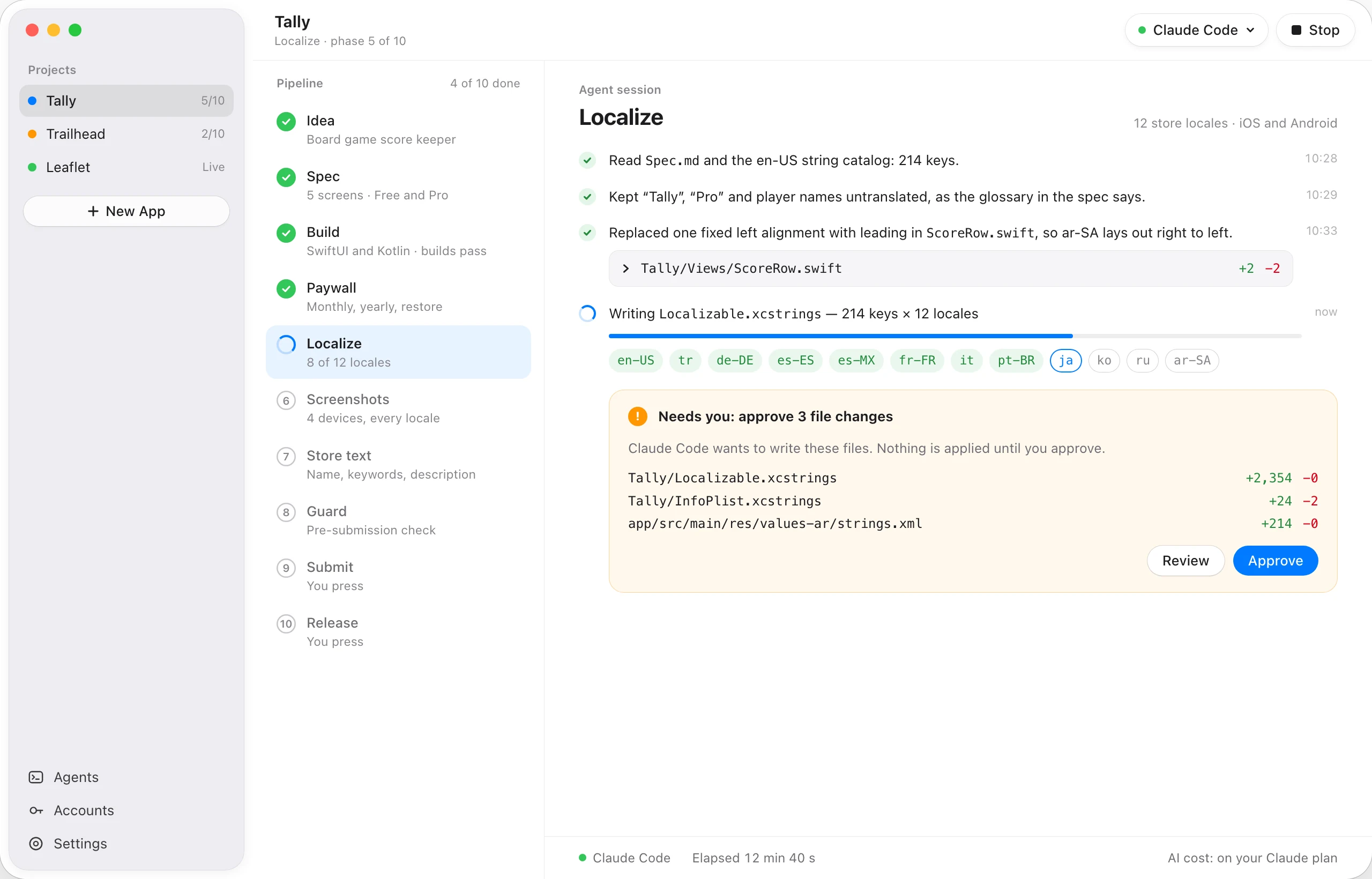
Claude Code, Codex, Gemini CLI or another coding agent, running on your Mac. We add no AI cost.
Your keys stay home.
App Store Connect and Google Play keys live in your Keychain.
You press Submit.
indiestudio stops at Submit and Publish. Those are yours.
The coding agent you already use.
indiestudio runs it on your Mac, in your project folder, on your own plan. Anything else that works from the command line can be added as a custom command.
- Claude Code
- Codex CLI
- Gemini CLI
- Cursor CLI
- GitHub Copilot CLI
- OpenCode
- Qwen Code
- Amp
- Aider
- Your own CLI
{prompt}
Product names and logos belong to their owners. indiestudio isn’t affiliated with or endorsed by them.
One app, ten phases, one window.
Each phase is done, running, waiting for you, or not started. Your agent does the work; you approve what it changes.
- 01IdeaOne paragraph: who would pay, and why.
- 02SpecScreens, free vs Pro, price.
- 03BuildYour agent writes SwiftUI and Kotlin.
- 04PaywallPlans, restore, terms. Previewed live.
- 05LocalizeAny of 50 App Store languages. You pick.
- 06ScreenshotsReal simulator captures, framed.
- 07Store textName to What’s New, per locale.
- 08GuardChecked before you submit.
- 09SubmitBoth stores. You press.
- 10ReleasePublish when approved. You press.
Catch the rejection before Apple does.
Before you submit, Guard checks the build and the store listing against reasons apps are known to be rejected for. Each failed check can go back to your agent with one click. Guard is free.
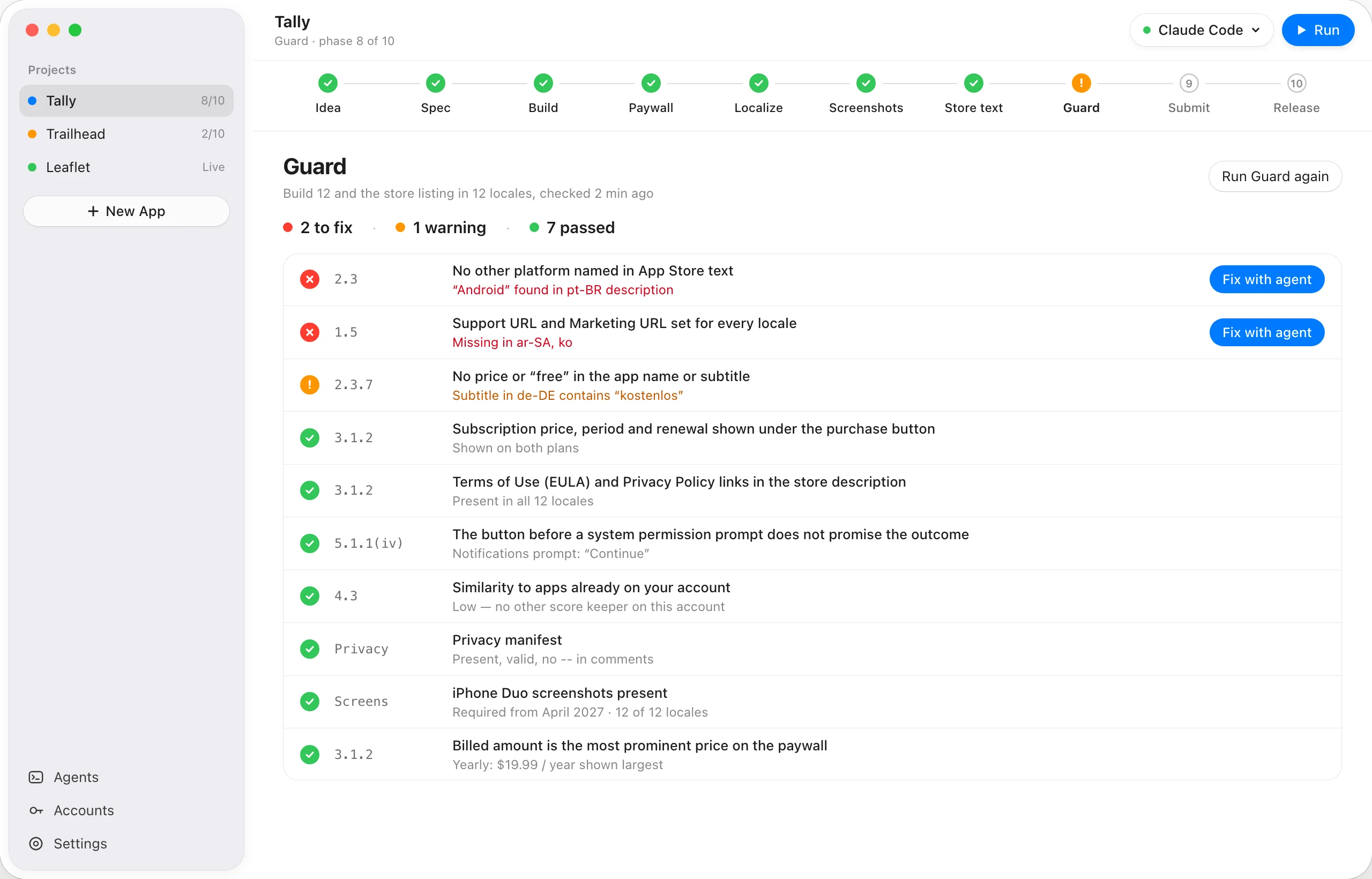
3.1.2Subscription price, period and renewal shown under the purchase button3.1.2Terms of Use (EULA) and Privacy Policy links in the store description2.3.7No price or “free” in the app name or subtitle2.3No other platform named in App Store text5.1.1(iv)The button before a system permission prompt does not promise the outcome4.3Similarity to apps already on your account
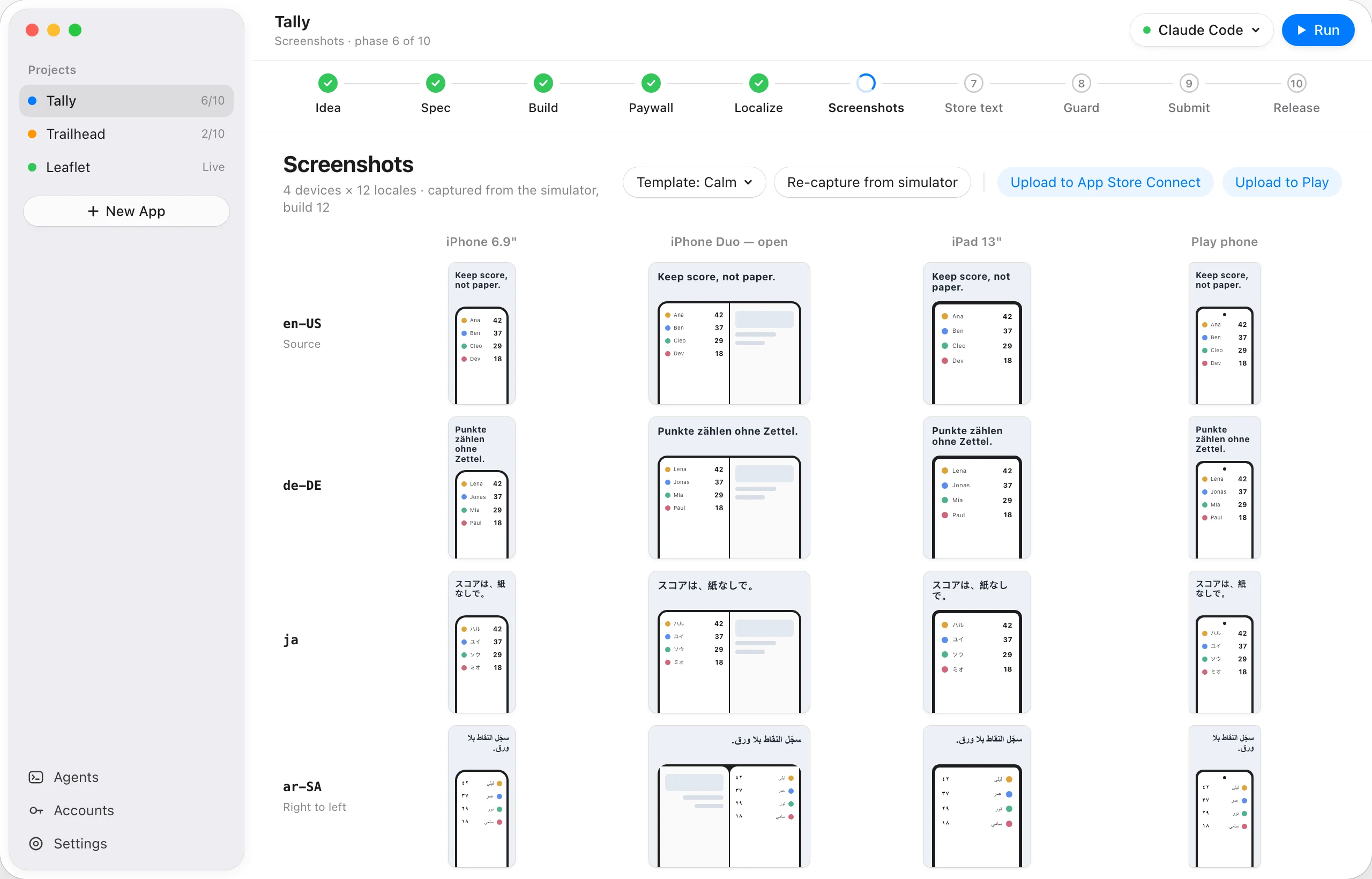
Screenshots in every language.
Only English, or English and Turkish, or all 50 App Store languages — you choose per app, and Arabic, Hebrew and Urdu read right to left. iPhone, iPhone Duo, iPad and Google Play.
Build it the way you build.
Start a new app in the stack you choose, or open one you already have: indiestudio reads its stack, its languages and its store text, and carries on from there.
SwiftUI + Kotlin
A normal Xcode project and a Jetpack Compose project, side by side.
Flutter
One Dart code base, ARB files for every language.
React Native
One TypeScript code base with Expo, ready for a development build.
Kotlin Multiplatform
Compose Multiplatform UI for iOS and Android.
Your repository.
A private GitHub repo through your own gh login, a commit after every phase, pushed for you. Apps you bring work on their own branch; your main is never touched.
Steer it in your own words.
“Make the add button bigger and put it under the list.” Tell the agent, see the change, keep it or revert it.
An MCP server, too.
Claude Code and other MCP clients can read your projects and run Guard through a local server that only this Mac can reach.
Get the beta.
We’re sending signed builds to a small group first. Leave your email and we’ll write once, when yours is ready.
FAQ
Do you charge for AI?
No. indiestudio runs the coding agent you already have — Claude Code, Codex, Gemini CLI, Cursor, Copilot and others — on your Mac, on your own plan.
Do I have to ship in many languages?
No. A new app starts in English (U.S.) only. Add Turkish, or the popular twelve, or all 50 App Store languages — per app, any time. The agent, Guard and screenshots work in exactly the languages you chose.
Which agents does it work with?
Claude Code, Codex CLI, Gemini CLI, Cursor CLI, GitHub Copilot CLI, OpenCode, Qwen Code, Amp and Aider. Any other agent that runs from the command line can be added with its own command.
Does indiestudio submit for me?
No. It prepares everything; you press Submit and Publish.
Where do my keys go?
Into your Mac’s Keychain. Nowhere else.
Who owns the code?
You. It’s a normal project for your stack (Xcode, Android Studio, Flutter, Expo or Kotlin Multiplatform) in a folder you choose, and in your own private GitHub repository if you connect one.
Can I use it on an app I already have?
Yes. Open its folder: indiestudio detects the stack, the platforms, the bundle id and the languages, then continues with localization, screenshots, store text, Guard and submission. It works on its own git branch and never pushes your main.
What’s free?
Guard. Add any project you already have and run every check on it, as often as you like. Running the agent pipeline, screenshots and submission need indiestudio Pro.
Why not the Mac App Store?
indiestudio has to run your developer tools and coding agents, which the Mac App Store sandbox doesn’t allow.
Will this get my app approved?
No tool can promise that. Guard checks the reasons we know apps get rejected for, before you submit.
Can I get a refund?
Yes. Within 14 days of a payment, for any reason. Write to hello@gen2apps.com.